Claude Code Alternative
Lastest update: May 29, 2026
Quick Answer: The best Claude Code Alternative in 2026 include Aider, OpenHands, GitHub Copilot, Cursor, and Continue.dev, depending on your budget, workflow, and preference for local versus cloud models.
Each tool handles agentic coding differently, so the right pick depends on your specific development environment and the complexity of tasks you need automated.
Key Takeaways
- Claude Code is a strong agentic coding tool, but it is not the only option and not always the most cost-effective one.
- Open-source alternatives like Aider and OpenHands give you full control over model choice and data privacy.
- GitHub Copilot remains the most widely adopted AI coding tool in enterprise environments as of 2026.
- Cursor and Windsurf offer tightly integrated IDE experiences that many developers find more practical than terminal-based agents.
- Local model setups using Ollama or LM Studio eliminate API costs entirely but require capable hardware.
- Multi-agent frameworks like CrewAI and AutoGen are worth exploring for complex, multi-step software projects.
- Security and data privacy should be evaluated before connecting any AI coding tool to a proprietary codebase.
- Most tools offer free tiers, but serious daily use typically costs between $10 and $40 per month.
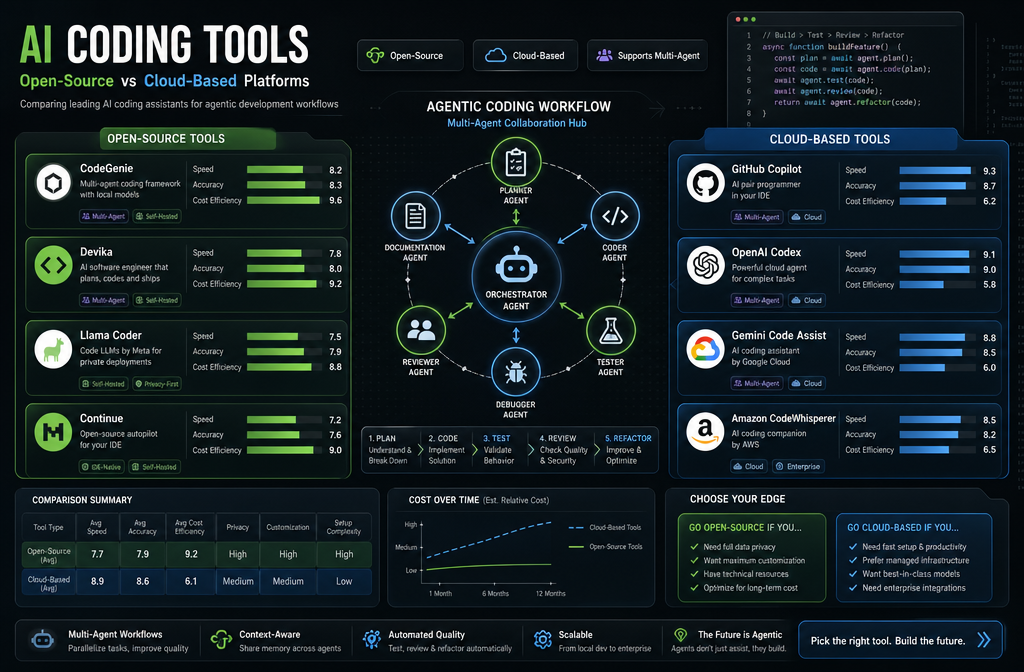
What Is Agentic Coding and Why Does It Matter?
Agentic coding refers to AI systems that can plan, execute, and iterate on multi-step coding tasks with minimal human input.
Instead of just completing a single line or function, an agentic tool can read your codebase, write new files, run tests, interpret errors, and fix its own mistakes in a loop.
Claude Code, Anthropic’s terminal-based coding agent, popularized this workflow for many developers. But the category has expanded rapidly.
In 2026, agentic coding is no longer a novelty; it is a practical workflow that developers across experience levels are adopting to ship faster.
Why this matters for your tool choice: Not every “AI coding assistant” is truly agentic. Some tools only autocomplete. Others can run shell commands and manage files. Knowing the difference prevents you from paying for a tool that can’t actually do what you need.
Is Claude AI Better Than GitHub Copilot for Coding?
Claude AI and GitHub Copilot serve different primary use cases, so “better” depends on what you’re doing. GitHub Copilot excels at inline autocomplete and IDE-integrated suggestions during active coding. Claude Code excels at longer, multi-step agentic tasks where you describe a goal and let the agent work through it.
- Choose GitHub Copilot if you want seamless autocomplete inside VS Code, JetBrains, or Neovim without changing your workflow.
- Choose Claude Code if you want to delegate entire features or debugging sessions to an agent that can read and modify multiple files.
- Common mistake: Developers often compare these tools on the same metric (code suggestion quality) when they actually solve different problems in the development workflow.
GitHub Copilot’s deep IDE integration and team management features make it the default choice for enterprise teams. Claude Code’s strength is in complex reasoning tasks and long-context understanding of large codebases.
How Much Does a Claude Code Alternative Cost?
Most Claude Code alternatives offer a free tier with usage limits, and paid plans generally range from $10 to $40 per month for individual developers. Enterprise pricing varies significantly.
| Tool | Free Tier | Paid Plan (Monthly) | Self-Hosted Option |
|---|---|---|---|
| GitHub Copilot | Limited (students/OSS) | $10 to $19 | No |
| Cursor | Yes (limited requests) | $20 | No |
| Aider | Yes (bring your own key) | API cost only | Yes |
| Continue.dev | Yes | Free (OSS) + API cost | Yes |
| OpenHands | Yes | API cost only | Yes |
| Windsurf | Yes | $15 | No |
| Codeium | Yes | $15 | Enterprise only |
Long-term cost consideration: Tools that charge a flat monthly fee are predictable.
Tools that pass through API costs (like Aider or OpenHands) can become expensive if you use frontier models like GPT-4o or Claude 3.5 Sonnet heavily.
Running a local model via Ollama eliminates API costs entirely but requires a machine with at least 16GB of RAM for decent performance.
Are There Open-Source Alternatives to Claude Code?
Yes, several strong open-source Claude Code alternatives exist and are actively maintained in 2026. The most capable ones are Aider, OpenHands (formerly OpenDevin), and Continue.dev.
Aider is a terminal-based agentic coding tool that works with any OpenAI-compatible API, including local models via Ollama. It maps your repository, writes code, runs tests, and commits changes to Git automatically. It is one of the most mature open-source options available.
OpenHands takes a more ambitious approach, running a full software engineering agent in a sandboxed environment. It can browse the web, execute code, and manage files, making it suitable for complex, multi-step projects.
Continue.dev is an open-source VS Code and JetBrains extension that lets you connect any model (local or cloud) for autocomplete, chat, and agentic tasks. It is highly customizable and has a growing library of community configurations.
Edge case: Open-source tools require more setup time and technical comfort. If you want something working in under five minutes, a commercial tool like Cursor or Copilot is more practical.
What Programming Languages Does Claude (and Its Alternatives) Support Best?
Claude and most major AI coding alternatives perform best with Python, JavaScript, TypeScript, Go, Rust, and Java. These languages are heavily represented in public training data, so models generate more accurate and idiomatic code for them.
Less common languages like Zig, Nim, or domain-specific languages (DSLs) tend to produce less reliable output across all tools. For these, you’ll want to provide more context and examples in your prompts.
Practical tip: If you work primarily in a niche language, test each tool with a representative sample of your actual codebase before committing to a subscription. Performance differences between tools are most visible at the edges of language support.
Can AI Coding Agents Actually Write Full Software Projects?
Partially, yes, but with important caveats. Agentic tools like Claude Code, OpenHands, and Aider can scaffold full projects, write multiple interconnected files, and iterate based on test results. However, they still struggle with very large codebases (over 100,000 lines), complex architectural decisions, and tasks requiring deep domain knowledge.
What works well:
- Generating boilerplate and project scaffolding
- Writing unit tests for existing functions
- Refactoring isolated modules
- Implementing well-defined features with clear specs
What still requires human oversight:
- System design and architecture decisions
- Security-sensitive code (authentication, cryptography)
- Performance optimization requiring profiling data
- Integrations with undocumented or proprietary APIs
A realistic workflow in 2026 is human-led with AI-accelerated execution, not full AI autonomy.
Pros and Cons of Claude vs ChatGPT for Coding
Both Claude (via Claude Code or the API) and ChatGPT (via GitHub Copilot or direct API) are capable coding assistants. The differences are meaningful but often overstated.
Claude strengths for coding:
- Longer context window handles large files and multi-file context better
- Tends to follow instructions more precisely in agentic settings
- Strong at explaining code and reasoning through bugs
ChatGPT / GPT-4o strengths for coding:
- Broader ecosystem of integrations and plugins
- Slightly faster response times in some configurations
- More familiar to developers already in the OpenAI ecosystem
The honest take: For most day-to-day coding tasks, the quality difference between Claude 3.5 Sonnet and GPT-4o is small. Workflow integration, pricing, and personal preference matter more than raw model quality at this point.
Which Coding Tasks Is Claude Not Good At?
Claude, like all current AI coding tools, has consistent weak spots. Knowing these helps you set realistic expectations and choose the right tool for the job.
- Long debugging sessions in unfamiliar frameworks: Claude can lose track of context across many back-and-forth exchanges.
- Real-time data or API calls: Claude has no live internet access in its base form, so it cannot check current library versions or live documentation.
- Highly optimized low-level code: Assembly, SIMD intrinsics, and GPU kernel optimization require specialized knowledge that current models handle inconsistently.
- Proprietary or internal APIs: Without documentation in the context window, Claude guesses, and those guesses are often wrong.
Common mistake: Developers paste an error message and expect an instant fix without providing the surrounding code context. AI coding tools perform significantly better when given the full relevant file, not just the error.
Is Claude Free for Developers?
Claude.ai offers a free tier with limited daily usage. Claude Code itself (the terminal agent) requires an Anthropic API key, which means you pay per token used. There is no flat-rate free plan for heavy Claude Code usage.
For developers who want free agentic coding, the better options are:
- Continue.dev with a local Ollama model (completely free)
- Aider with a local model (completely free)
- GitHub Copilot free tier (available to verified students and open-source maintainers)
- Codeium (free tier with generous limits for individual developers)
How Accurate Is Claude’s Code Generation?
Code generation accuracy varies by task complexity. For well-defined, single-function tasks in popular languages, Claude 3.5 Sonnet and comparable models produce working code the majority of the time on the first attempt. Accuracy drops as task complexity increases.
Factors that most affect accuracy:
- Quality and specificity of your prompt
- Amount of relevant context provided
- Language and framework familiarity
- Whether the task requires external API knowledge
Benchmark note: Published coding benchmarks like HumanEval and SWE-bench give a rough sense of relative model performance, but real-world accuracy in your specific codebase will differ.
Always treat AI-generated code as a draft that needs review, not production-ready output.
Setup Steps for Using a Claude Code Alternative in Your Workflow
Getting started with most Claude Code alternatives takes less than 30 minutes. Here is a practical setup path for the most common scenarios:
For Cursor (fastest start):
- Download Cursor from cursor.sh and install it.
- Sign in and activate your free or paid plan.
- Open your project folder and start using Cmd+K (or Ctrl+K) to prompt in-file edits.
- Use the Composer panel for multi-file agentic tasks.
For Aider (open-source, terminal-based):
- Install via pip:
pip install aider-chat - Set your API key as an environment variable (OpenAI, Anthropic, or a local model endpoint).
- Run
aiderin your project directory. - Type your request in plain English and let Aider edit files and commit changes.
– Continue.dev (VS Code integration):
- Install the Continue extension from the VS Code marketplace.
- Open the Continue config file and add your preferred model (local or cloud).
- Use the sidebar chat for questions and Cmd+I for inline edits.
Integration complexity tip: If your team uses a monorepo or has strict Git branch policies, test your chosen tool’s Git behavior before rolling it out widely. Some agentic tools commit directly to your current branch without asking.
Which Type of Developer Should Use Claude Code Alternatives?
The right tool depends on your role, experience level, and primary tasks.
- Solo developers and freelancers benefit most from cost-effective tools like Aider with local models or Codeium’s free tier.
- Frontend developers who live in VS Code will find Cursor or Continue.dev more natural than terminal-based agents.
- Backend and systems developers handling complex logic and multi-file refactors get the most value from full agentic tools like Claude Code or OpenHands.
- Enterprise teams need tools with SSO, audit logs, and data privacy guarantees, which points toward GitHub Copilot Enterprise or self-hosted options.
- Beginners should start with GitHub Copilot or Cursor because the onboarding is smoother and the suggestions are more contextually aware of what you’re already typing.
Common Mistakes Developers Make With AI Coding Assistants
Avoiding these mistakes will save you hours of frustration and improve the quality of AI-generated code significantly.
- Providing too little context. AI tools perform better when you share the relevant file, not just the function or error message.
- Accepting output without review. AI-generated code can be subtly wrong, especially around edge cases and error handling.
- Using the wrong tool for the task. Autocomplete tools are not agentic agents. Using Copilot for a task that needs OpenHands will frustrate you.
- Ignoring security implications. AI tools can generate code with known vulnerabilities, especially around input validation and authentication. Always run a security linter on AI-generated code before merging.
- Not iterating on prompts. Your first prompt is rarely optimal. Refining it once or twice usually produces dramatically better results.
- Skipping tests. AI-generated code needs tests just as much as human-written code, sometimes more.
Security Considerations When Using AI Coding Tools
Security is one of the most under-discussed topics in AI coding tool comparisons. Before connecting any tool to your codebase, consider the following:
- Data transmission: Cloud-based tools send your code to external servers. Check the vendor’s data retention and training policies before using them with proprietary code.
- Local model advantage: Tools running on local models (via Ollama or LM Studio) never send your code outside your machine, which is a meaningful advantage for sensitive projects.
- Generated vulnerability risk: Studies have found that AI-generated code can introduce security vulnerabilities at a non-trivial rate, particularly in areas like SQL queries, file handling, and authentication flows. Always pair AI coding tools with static analysis tools like Semgrep or Snyk.
- Supply chain risk: AI tools that can run shell commands or install packages introduce new attack surface. Review what commands your agentic tool is executing, especially in automated pipelines.

How Does Claude Handle Complex Coding Challenges?
Claude performs well on complex reasoning tasks because of its long context window and instruction-following precision.
For multi-file refactors, architectural explanations, or debugging sessions that span many files, Claude tends to maintain coherence better than smaller models.
However, complexity has a ceiling. Tasks that require understanding an entire large codebase simultaneously, making real-time API calls, or producing highly optimized performance-critical code still challenge Claude and every other current model.
Practical strategy for complex tasks: Break large tasks into smaller, well-defined subtasks. Give the model one clear goal per session.
This approach consistently produces better results than a single vague prompt asking for a complete feature.
FAQ
What is the best free Claude Code alternative for individual developers?
Continue.dev paired with a local Ollama model is the best fully free option. It requires no API key and runs entirely on your machine, though you need hardware capable of running a 7B to 13B parameter model comfortably.
Can I use Claude Code alternatives with local AI models?
Yes. Aider, Continue.dev, and OpenHands all support local models via Ollama or LM Studio. This eliminates API costs and keeps your code private.
Is Cursor better than Claude Code?
Cursor is better for developers who want IDE-native integration and a polished UI. Claude Code is better for developers comfortable in the terminal who want a more autonomous agent with strong reasoning capabilities.
How do multi-agent coding frameworks differ from single-agent tools?
Multi-agent frameworks like CrewAI or AutoGen coordinate multiple AI agents with different roles (planner, coder, reviewer) working on a task simultaneously. Single-agent tools like Claude Code use one model in a loop. Multi-agent setups can handle more complex projects but are harder to configure and debug.
What is the most cost-effective Claude Code alternative for a small team?
GitHub Copilot at $19 per user per month offers the best combination of team management features, IDE integration, and reliability for small teams. For cost-conscious teams comfortable with open-source tools, Aider with a shared API key is significantly cheaper.
Claude Code Alternative: FAQs
Do AI coding tools work with private or internal codebases?
Yes, but with caveats. You need to provide relevant context manually or use a tool with repository indexing (like Cursor or Codeium). Cloud tools will transmit your code to their servers, so review their privacy policies first.
How often does AI-generated code need to be fixed?
For simple, well-defined tasks in popular languages, AI-generated code often works on the first try. For complex tasks, expect to review and adjust roughly 30 to 60 percent of the output. Treat AI code as a strong first draft, not a finished product.
Which Claude Code alternative is best for Python development?
Aider has a strong reputation specifically for Python projects due to its Git integration and support for running tests automatically. Cursor is also excellent for Python with its Jupyter notebook support and inline editing.
Can AI coding tools replace junior developers?
No. Current AI coding tools accelerate experienced developers and help beginners learn faster, but they cannot replace the judgment, communication, and domain knowledge that junior developers develop over time. They are productivity tools, not replacements.
What should I look for when evaluating a Claude Code alternative?
Evaluate on five criteria: model quality for your language stack, IDE or workflow integration, data privacy policy, pricing predictability, and agentic capability (can it run multi-step tasks autonomously or only autocomplete?).
Conclusion: How to Choose the Right Claude Code Alternative
The AI coding tool market in 2026 is mature enough that there is a strong option for almost every developer profile and budget. Here is a simple decision framework:
- Want the fastest setup and best IDE integration? Start with Cursor or GitHub Copilot.
- Need full data privacy and zero API costs? Set up Continue.dev or Aider with a local Ollama model.
- Working on complex, multi-file agentic tasks? Evaluate Claude Code, OpenHands, or Aider with a frontier model.
- Managing a team with enterprise requirements? GitHub Copilot Enterprise or a self-hosted Continue.dev deployment is your safest path.
Before committing to any tool, spend one week using its free tier on a real project from your current workload.
Benchmarks and reviews (including this one) give you a starting point, but your specific codebase, language stack, and workflow will determine which tool actually saves you time.
The goal is not to find the “best” AI coding tool in the abstract. The goal is to find the one that fits how you actually work, and then use it consistently enough to build real productivity gains.