Best VPS For Openclaw
Last updated: August 14, 2026
Quick Answer: The Best VPS For Openclaw in 2026 is Hetzner Cloud (CX22 or CX32), which delivers 2 to 4 vCPUs and 4 to 8 GB RAM on NVMe SSDs at roughly $4 to $8 per month, giving you 3 to 4 times better price-performance than comparable plans on DigitalOcean or Linode.
Contabo is the runner-up for maximum raw compute per dollar, while managed platforms like Heraclaw suit teams that want a working OpenClaw Gateway in under 60 seconds without touching a terminal. Hetzner stock availability varies by region, so always check before committing.
Key Takeaways
- OpenClaw requires a minimum of 1 CPU core and 1 GB RAM, but the practical starting point is 2 cores and 4 GB RAM on a modern Linux VPS with Node.js 22 or higher.
- Hetzner CX22 (2 vCPU, 4 GB RAM, NVMe SSD) at roughly $4 to $5 per month is the top-ranked OpenClaw VPS for most users in 2026.
- Contabo VPS plans offer the most raw CPU and RAM per dollar, making them a strong choice for multi-agent or browser-heavy OpenClaw workloads.
- Local model deployments via Ollama push requirements to 16 GB RAM or more, which changes the VPS calculus significantly.
- Managed OpenClaw hosting (Heraclaw) removes server administration entirely, trading some price-performance for one-click deploys and built-in monitoring.
- Node.js 20 and below can break with newer OpenClaw Gateway builds; always install Node 22 or higher via a version manager on your VPS.
- Free tiers (Oracle Cloud, AWS Lightsail credits) can host a basic Gateway, but long-term production use almost always moves to a paid plan.
- Security, DDoS protection, and SSH hardening are your responsibility on any unmanaged VPS, and they add real operational overhead.
What Is OpenClaw and Why Do You Need a VPS for It
OpenClaw is an open-source AI agent framework that lets you deploy autonomous agents capable of browsing the web, calling APIs, and integrating with tools like Docker, Telegram, Slack, and Discord.
The OpenClaw Gateway is the core server process that manages agent sessions, and it needs to run continuously on a stable host, which is why a VPS is the standard deployment target rather than a local laptop or shared hosting account.
Shared hosting cannot run OpenClaw reliably. Shared environments block long-running Node.js processes, restrict outbound HTTPS on port 443, and impose memory limits that kill the Gateway mid-session.
A VPS gives you root access, a persistent process environment, and a dedicated VPS IP, which are all non-negotiable for production OpenClaw deployments.
Official OpenClaw documentation confirms that the Gateway can run on “any Linux server or cloud VPS” with a modern 64-bit OS and supported Node.js LTS.
The OpenClaw framework also relies on a Control UI for agent management, SSH for server access, and a Gateway binding step during initial setup.
All of these require a stable, publicly reachable server, which shared hosting simply cannot provide.
TL;DR: Which VPS Should You Use for OpenClaw
For most users, Hetzner Cloud CX22 is the correct answer.
It hits every practical OpenClaw VPS requirement at the lowest price point among reputable providers, and it has a track record of consistent uptime and clean Ubuntu images that make Node.js 22 installation straightforward.
If Hetzner stock is unavailable in your region, Contabo VPS is the next best option for raw value.
Here is the short version by use case:
- Single agent, API-only: Hetzner CX22 (2 vCPU, 4 GB RAM, ~$4 to $5/month)
- Multi-agent or browser skills: Hetzner CX32 (4 vCPU, 8 GB RAM, ~$7 to $8/month)
- Maximum compute per dollar: Contabo VPS (4 vCPU, 8 GB RAM, typically under $8/month)
- No server admin wanted: Heraclaw managed OpenClaw (Gateway live in ~60 seconds)
- Click-through simplicity: Hostinger VPS with OpenClaw template
- Local model hosting (Ollama): 16 GB RAM minimum, consider larger Contabo or dedicated instances
OpenClaw VPS Requirements: What the Agent Actually Needs
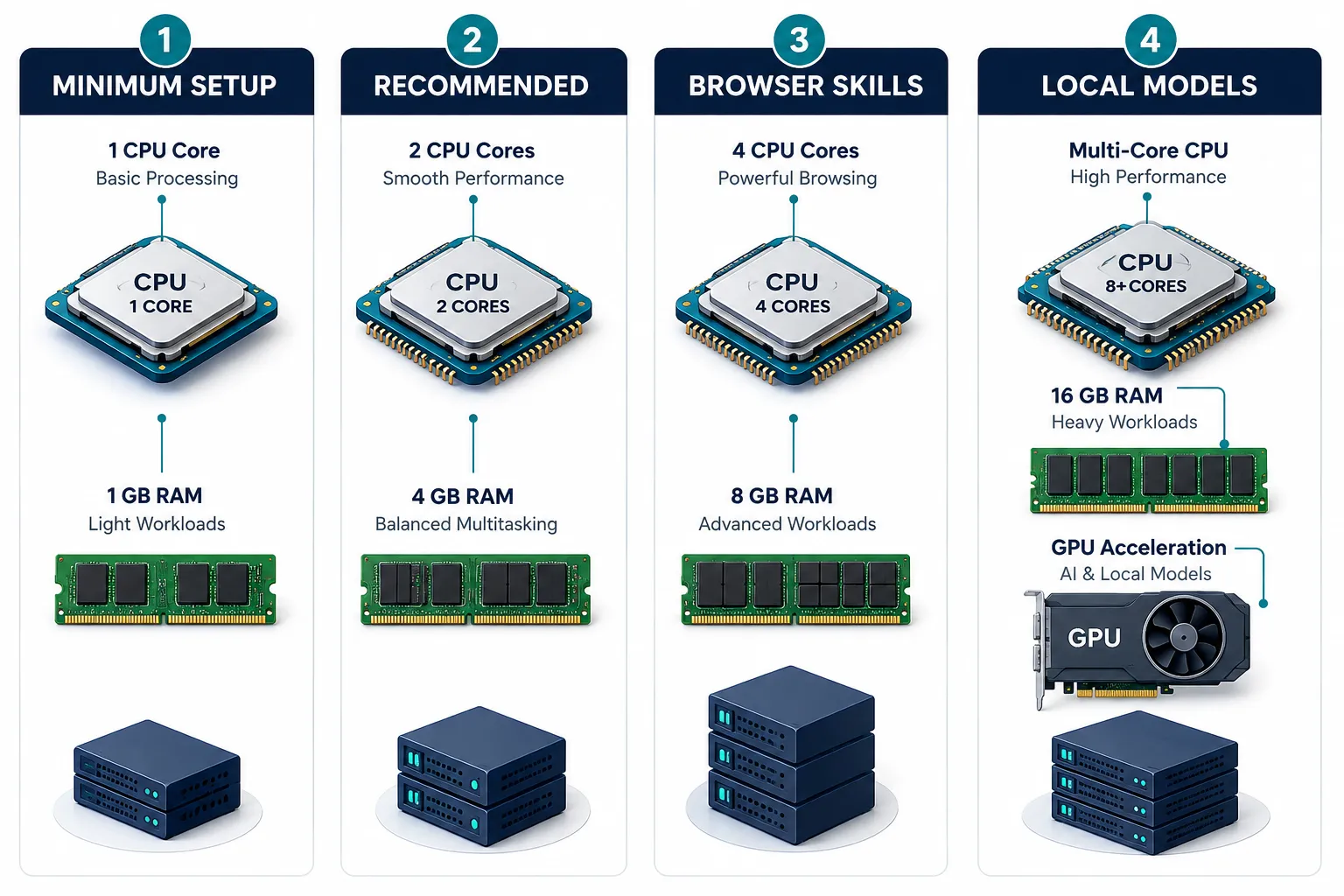
The absolute minimum for running OpenClaw is 1 CPU core, 1 GB RAM, and roughly 1 to 2 GB of free disk space on a 64-bit Linux OS.
In practice, that minimum is too tight for anything beyond a quick test. OpenClaw system requirement guides from 2026 consistently recommend 2 CPU cores, 4 GB RAM, and 10 to 20 GB of SSD storage as the realistic starting point.
Minimum vs. Recommended Specs
| Spec | Minimum | Recommended | Heavy (Browser/Local Models) |
|---|---|---|---|
| CPU Cores | 1 vCPU | 2 vCPU | 4+ vCPU |
| RAM | 1 GB | 4 GB | 8 to 16 GB |
| Storage | 10 GB SSD | 20 GB NVMe SSD | 40 to 80 GB NVMe SSD |
| Node.js | 22 LTS | 22 or 24 LTS | 24 LTS recommended |
| OS | Ubuntu 20.04 | Ubuntu 22.04+ | Ubuntu 22.04+ or Debian 12+ |
| Network | Outbound HTTPS port 443 | 1 Mbps stable up/down | 10 Mbps+ for browser tasks |
Rule of Thumb
If you are running a single always-on agent using cloud LLM APIs (Claude, GPT-4, etc.), a 2 vCPU / 4 GB RAM VPS is your floor.
Add browser-based skills or Chromium-driven tasks and you need 4 vCPU / 8 GB RAM. Switch to local models via Ollama and you need at least 16 GB RAM, which puts you in a different price bracket entirely.
Agensi’s 2026 system requirements guide draws this same line clearly: cloud API agents need 4 GB RAM, local model agents need 16 GB or more.
Critical runtime note: Node.js 20 and below can fail at startup or misbehave with newer OpenClaw Gateway builds.
Always install Node 22 or higher via a version manager (nvm or fnm) on your VPS, not via the system package manager, which often ships outdated versions.
Crewclaw’s 2026 requirements guide flags this as one of the most common setup failures.
The Best VPS Options for OpenClaw in 2026
The best VPS for OpenClaw balances price, NVMe SSD performance, clean Linux images, and reliable SSH access. Based on independent benchmarks and community consensus across Reddit threads and comparison guides, six providers dominate the conversation in 2026.
Hetzner: The Default Pick
Hetzner Cloud is the most frequently recommended VPS for OpenClaw in 2026, and the data backs it up. OpenClaw Playbook’s detailed guide notes that Hetzner’s CX21 plan delivers 3 to 4 times better price-performance than comparable plans on DigitalOcean or Linode.
The CX32 tier (4 vCPU, 8 GB RAM, 80 GB NVMe SSD) at roughly $7 to $8 per month is specifically named as the “Best VPS For OpenClaw” in 2026 on performance-per-dollar in a March 2026 benchmark from Cognio.
Why Hetzner works for OpenClaw:
- NVMe SSDs improve agent responsiveness and log write speeds noticeably versus HDD-backed instances
- Clean Ubuntu 22.04 and Debian 12 images with easy SSH access, no proprietary panel complications
- Hetzner does not aggressively rate-limit outbound HTTPS traffic, which matters for LLM API calls
- EU and US data center locations with low latency to major LLM API endpoints
- Straightforward DDoS protection included at no extra cost
Caveat: Hetzner stock in popular regions (Nuremberg, Falkenstein, Ashburn) sells out. Check availability before planning a deployment.
If the CX22 is unavailable, the CPX22 (AMD EPYC, same RAM) is a solid alternative at a similar price point.
Contabo: Maximum Compute Per Dollar
Contabo VPS plans consistently offer more vCPUs and GB RAM per dollar than any other mainstream provider.
A typical Contabo VPS entry plan delivers 4 vCPU and 8 GB RAM for under $8 per month, which is roughly double the raw specs of a Hetzner CX22 at a similar price.
Kilo.ai’s 2026 VPS comparison lists Contabo as the runner-up specifically because of this compute density.
The trade-off is that Contabo’s network performance and disk I/O have historically been more variable than Hetzner’s, and their support response times are slower.
For OpenClaw workloads that are CPU-bound (multi-agent orchestration, browser task queues), Contabo VPS is an excellent choice.
For latency-sensitive single-agent API calls, Hetzner’s more consistent NVMe performance may be preferable.
OpenClaw Contabo deployments are well-documented in community forums, and the setup process is identical to any other Linux VPS.
Hostinger: The “I Just Want a Template” Path
Hostinger VPS offers a one-click OpenClaw template that reduces setup time for users who are not comfortable with SSH and manual Node.js installation.
The OpenClaw template on Hostinger handles the initial Gateway configuration, making it a reasonable choice for non-DevOps teams.
The trade-off is higher per-unit cost compared to Hetzner or Contabo for equivalent specs, and some lock-in to Hostinger’s control panel rather than a clean Linux environment.
If you want an OpenClaw template experience without building from scratch, Hostinger is the path. If you are comfortable with SSH and a basic Linux setup, you will get more value from Hetzner or Contabo.
OVHcloud: Enterprise Infrastructure, DIY Everything
OVHcloud provides enterprise-grade infrastructure with strong DDoS protection and European data sovereignty compliance.
It is a legitimate option for organizations with compliance requirements, but it demands more DIY setup than Hetzner or Hostinger.
There is no OpenClaw template, documentation is less beginner-friendly, and support for individual VPS tiers is minimal.
Cybernews’ OpenClaw hosting comparison includes OVHcloud as a valid option but notes the higher operational overhead.
DigitalOcean: Best Docs, Worst Pricing
DigitalOcean has the best documentation ecosystem of any VPS provider, and its Droplets are easy to configure for OpenClaw.
The problem is pricing: DigitalOcean charges roughly 2 to 4 times more than Hetzner for equivalent specs. A 2 vCPU / 4 GB RAM Droplet runs around $24 per month versus Hetzner’s $4 to $5 for comparable performance.
For teams that already use DigitalOcean’s ecosystem (managed databases, Spaces object storage, App Platform), the integration convenience may justify the premium.
For pure OpenClaw VPS hosting, the value proposition is weak.
IONOS: Cheapest on Paper
IONOS frequently appears in “cheap VPS” comparisons with headline prices below $2 per month. In practice, the entry-tier plans often have constrained I/O performance and limited geographic options.
For a basic OpenClaw Gateway running a single API-only agent, IONOS can work, but the performance ceiling is low and community support resources are sparse compared to Hetzner or DigitalOcean.
Honourable Mentions: Oracle Cloud Free Tier, AWS Lightsail, Google Dev Cloud
Oracle Cloud’s Always Free tier (4 ARM cores, 24 GB RAM) is technically capable of running OpenClaw at zero cost, but account approval is inconsistent and the ARM architecture requires verifying Node.js 22 ARM64 compatibility.
AWS Lightsail offers predictable pricing with good documentation but sits in the same expensive bracket as DigitalOcean.
Google Cloud’s free credits work for development testing. None of these are recommended for production OpenClaw VPS deployments unless you already have credits or existing infrastructure on those platforms.
Stack Junkie’s 2026 VPS guide covers these as honourable mentions for exactly this reason.
OpenClaw VPS Providers at a Glance
| Provider | Best For | RAM / CPU Sweet Spot | Key Strength | Key Weakness |
|---|---|---|---|---|
| Hetzner | Most users | 4 GB / 2 vCPU (CX22) | Price-performance, NVMe | Stock availability |
| Contabo | Multi-agent, heavy workloads | 8 GB / 4 vCPU | Raw compute per dollar | Variable I/O, slower support |
| Hostinger | Non-DevOps teams | 4 GB / 2 vCPU | OpenClaw template | Higher cost, panel lock-in |
| OVHcloud | Enterprise / compliance | 8 GB / 4 vCPU | DDoS, EU data sovereignty | DIY everything |
| DigitalOcean | Existing DO ecosystem users | 4 GB / 2 vCPU | Documentation quality | Expensive for specs |
| IONOS | Absolute budget minimum | 2 GB / 1 vCPU | Low entry price | Low performance ceiling |
How to Set Up OpenClaw on a VPS: Step-by-Step
Setting up OpenClaw on a VPS takes roughly 15 to 30 minutes on a clean Ubuntu 22.04 instance with SSH access. The process is the same across Hetzner, Contabo, DigitalOcean, and most other providers.
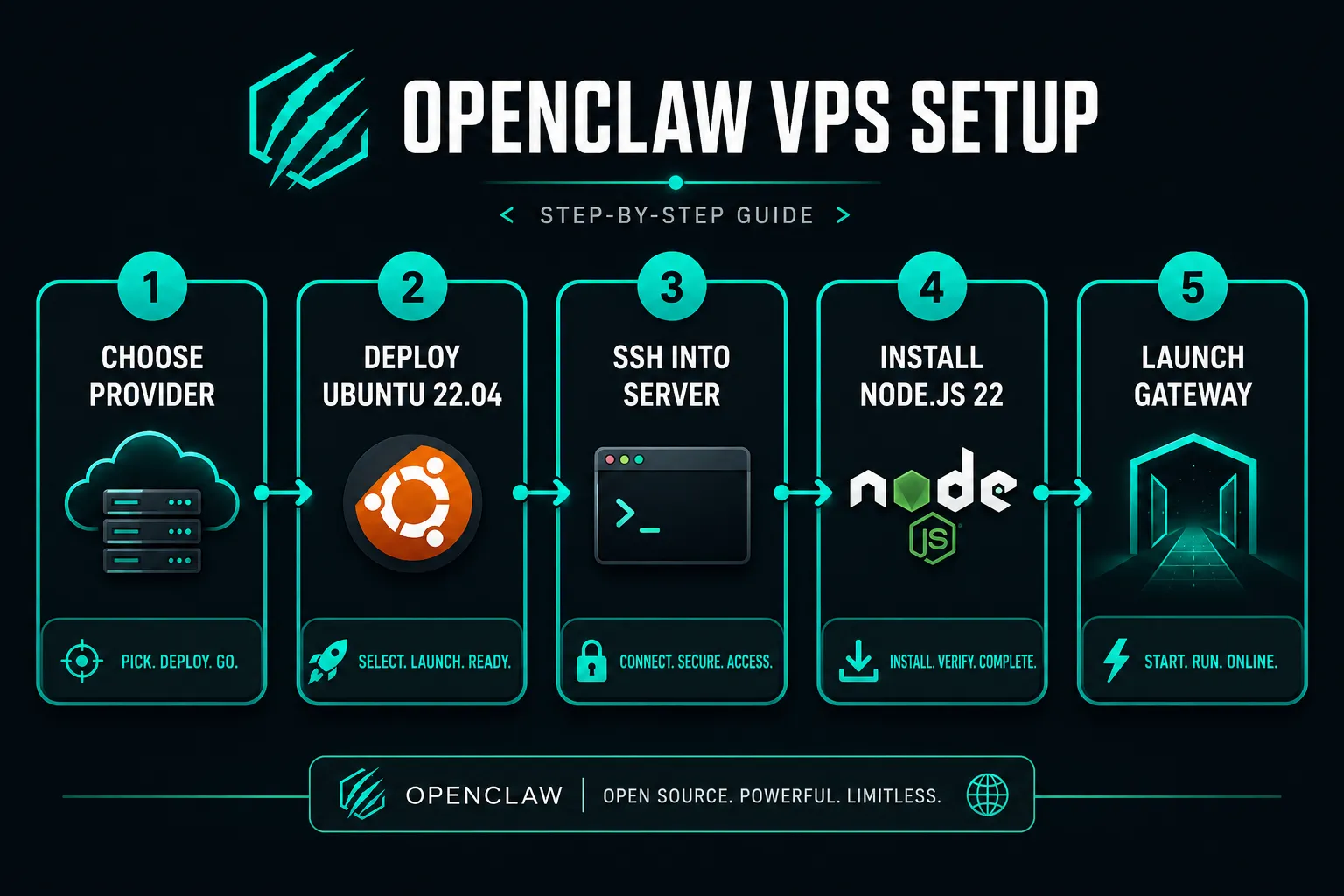
- Provision your VPS. Choose Ubuntu 22.04 LTS (or Debian 12) as the OS image. Enable SSH key authentication during setup. Note your VPS IP address from the provider dashboard.
- SSH into the server. Run
ssh root@YOUR_VPS_IPfrom your local terminal. For OpenClaw, SSH is the primary administration interface. - Install Node.js 22 or higher via nvm. Do not use
apt install nodejsdirectly, as it installs outdated versions. Run the nvm install script, thennvm install 22andnvm use 22. OpenClaw documentation explicitly requires a supported Node.js LTS version. - Clone the OpenClaw Gateway repository from GitHub. Run
git clone https://github.com/openclaw/gateway(check GitHub for the current repository URL) and navigate into the directory. - Install dependencies and configure environment variables. Run
npm install, then copy the example.envfile and set your API keys, Gateway binding address, and any Security tokens. - Start the Gateway. Run
npm startor use a process manager like PM2 (pm2 start) to keep the Gateway active after SSH sessions end. - Connect via the Control UI. Open the OpenClaw Control UI in your browser, enter your VPS IP and Gateway port, and complete the pairing step. The Gateway is now active and ready for agent deployment.
Common mistake: Skipping the process manager step means your Gateway stops when you close the SSH session. Always use PM2 or a systemd service for production OpenClaw deployments.
Why a Cheap OpenClaw VPS Gets Expensive Fast
A cheap VPS for OpenClaw looks attractive at $2 to $3 per month, but several hidden costs push the true price higher. Understanding these before you buy saves real money and frustration.
1. Gateway Binding and the Pairing Required Wall
OpenClaw’s Gateway binding process requires a stable, publicly reachable VPS IP. Some ultra-cheap providers use shared or NAT-based networking that makes the VPS IP unreachable from the public internet without additional configuration. This blocks the pairing step in the Control UI entirely. Resolving it often requires upgrading to a plan with a dedicated IP, which erases the initial savings.
2. OAuth Refresh Storms
When OpenClaw agents use OAuth-authenticated integrations (Google Workspace, Microsoft 365, etc.), token refresh cycles generate bursts of outbound HTTPS traffic. On providers that throttle outbound connections or impose egress rate limits, these refresh storms cause agent failures and require manual intervention. Hetzner and Contabo do not impose these limits on standard VPS plans.
3. Headless Browser Breakage
Browser-based OpenClaw skills require Chromium or a compatible headless browser running on the VPS. On 1 GB RAM instances, Chromium’s memory footprint alone can consume the entire available RAM, causing the Gateway process to be killed by the Linux OOM killer. This is the most common failure mode on underpowered cheap VPS plans. The fix is always “upgrade to 4 GB RAM,” which costs more than starting there.
4. Bot Detection on Datacenter IPs
Some web services detect and block traffic from well-known datacenter IP ranges. This is a real limitation for OpenClaw browser agents that need to interact with consumer web services. It is not provider-specific, but it is more common on large providers (AWS, Google Cloud, Azure) whose IP ranges are heavily flagged. Hetzner and Contabo have lower detection rates in practice, though no datacenter IP is immune.
5. Security Surface You Now Own
Every unmanaged VPS is a Security responsibility. You own SSH hardening, firewall rules, DDoS mitigation (beyond what the provider supplies), and OS patching. A misconfigured VPS running OpenClaw with exposed ports is a real attack surface. Budget providers often include minimal DDoS protection, which means a volumetric attack can take your Gateway offline. Factor in the time cost of Security maintenance when comparing a cheap VPS against a managed OpenClaw platform.
Managed OpenClaw vs. Self-Managed VPS: Which Should You Choose
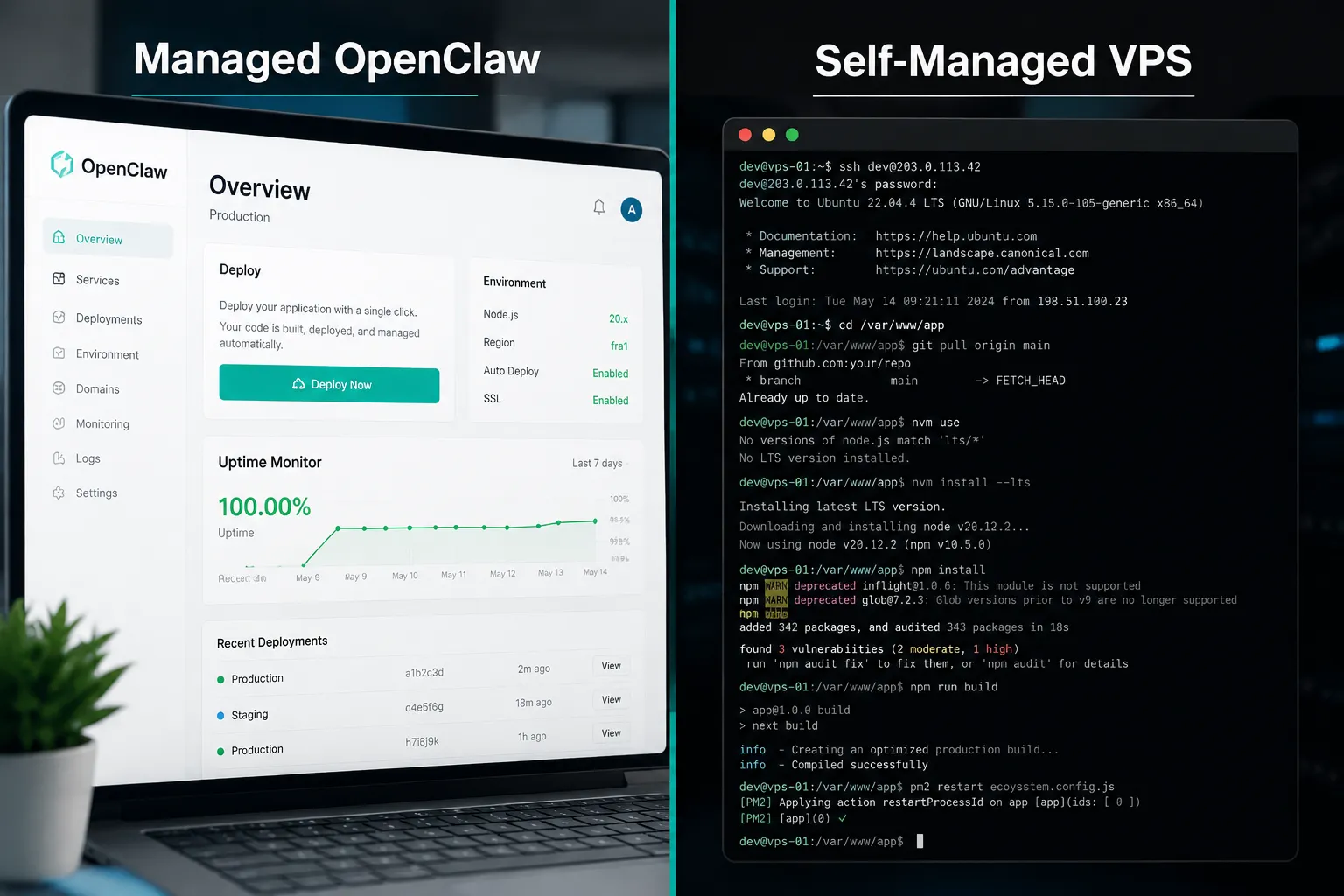
Managed OpenClaw hosting (primarily Heraclaw) is the right choice when your team lacks Linux administration experience or when deployment speed matters more than cost optimization. Self-managed VPS is the right choice when you want full control, lower cost, and are comfortable with SSH, Node.js, and basic Linux security.
GetOpenClaw.ai’s managed hosting overview describes Heraclaw as OpenClaw “managed for you,” built by the same team, with a working Gateway live in roughly 60 seconds. That is a genuine value proposition for non-DevOps teams or for rapid prototyping. The trade-off is that managed OpenClaw hosting costs more per month than a Hetzner or Contabo VPS at equivalent specs, and you have less control over the runtime environment, Node.js version upgrades, and custom configuration.
Choose managed OpenClaw hosting if:
- You want a Gateway running without touching a terminal
- Your team has no Linux or DevOps experience
- You need built-in monitoring and one-click scaling
- You are evaluating OpenClaw before committing to self-hosted infrastructure
Choose a self-managed VPS if:
- You are comfortable with SSH and basic Linux commands
- You want the lowest possible cost per GB RAM
- You need custom Node.js versions, Docker containers, or specific Security configurations
- You are running multiple services on the same server alongside OpenClaw
OpenClaw VPS Security Requirements and Best Practices
Security on an OpenClaw VPS is your responsibility from day one. The Gateway exposes a network port, and without proper hardening, it is reachable by anyone who knows your VPS IP.
Minimum Security checklist for any OpenClaw VPS:
- Disable password SSH authentication; use SSH key pairs only
- Configure a firewall (ufw on Ubuntu) to allow only ports 22 (SSH), 80, and 443 by default
- Run the OpenClaw Gateway behind a reverse proxy (Nginx or Caddy) with TLS, not directly on port 80
- Set a strong Gateway API token in your
.envconfiguration; never use the default or a blank value - Enable automatic OS security updates (
unattended-upgradeson Ubuntu) - Use a non-root Linux user for running the Gateway process in production
- Review your provider’s DDoS protection tier; upgrade if you expect high-traffic agent workloads
DDoS protection quality varies significantly by provider. OVHcloud and Hetzner both include meaningful DDoS mitigation at the network level. IONOS and some budget providers offer minimal protection. If your OpenClaw agents are customer-facing or handle sensitive data, DDoS resilience should factor into your provider choice.
OpenClaw VPS vs. Dedicated Server: Which Is Better
For the vast majority of OpenClaw deployments, a VPS is the correct choice. Dedicated servers make sense only when you are running local LLM models (Ollama with large parameter models), need GPU acceleration for inference, or are orchestrating dozens of concurrent browser agents that saturate a shared VPS’s CPU allocation.
A dedicated server for OpenClaw costs $40 to $150 per month at entry level, versus $4 to $8 per month for a Hetzner or Contabo VPS. The performance gap only justifies that cost difference at scale. Agensi’s system requirements analysis draws this line at local model hosting: cloud API agents on a VPS, local models on a dedicated or GPU-backed server.
For teams exploring multi-agent orchestration at scale, the 2026 trajectory is toward 4 to 8 vCPU instances with 16 to 32 GB RAM, or GPU VPS options for on-box inference, rather than true dedicated hardware.
Best VPS For Openclaw: Reddit and Community Consensus
Reddit threads and community forums in 2026 consistently surface the same shortlist. The community consensus, summarized from multiple threads and comparison guides, points to Hetzner as the default recommendation, with Contabo as the value alternative and Hostinger for users who want a template-driven setup.
Community-specific notes worth knowing:
- Several Reddit users report that Hetzner’s CX22 handles a single always-on OpenClaw agent with room to spare, and that the CX32 is the upgrade path for browser-heavy workloads.
- Contabo VPS gets positive mentions for multi-agent setups where raw CPU and GB RAM matter more than latency consistency.
- Free VPS options (Oracle Always Free, Google Cloud credits) appear in threads but with consistent caveats about account approval friction and ARM compatibility issues with Node.js 22.
- The “best VPS for OpenClaw Reddit” search consistently surfaces Kilo.ai’s comparison and Cybernews’ hosting guide as the most cited external resources.
- Performance VPS options from Hetzner (the CX and CPX lines) are preferred over budget shared-CPU instances from any provider, because OpenClaw’s Gateway process benefits from dedicated CPU time during agent task execution.
Conclusion: Picking the Best VPS For Openclaw in 2026
The Best VPS For Openclaw in 2026 is Hetzner CX22 for single-agent API workloads and Hetzner CX32 for multi-agent or browser-heavy deployments.
Contabo VPS is the right call if you need maximum compute per dollar and can accept slightly less consistent I/O performance.
Managed OpenClaw via Heraclaw is the correct answer if you want zero server administration.
Your next steps:
- Decide whether you need managed or self-managed hosting based on your team’s Linux comfort level.
- If self-managed, check Hetzner CX22 availability in your target region. If unavailable, go to Contabo VPS.
- Provision Ubuntu 22.04 LTS, SSH in, and install Node.js 22 via nvm before anything else.
- Follow the seven-step setup process above to get your Gateway active and paired with the Control UI.
- Harden your Security configuration (SSH keys, firewall, reverse proxy with TLS) before connecting any agents to live data sources.
- Revisit your instance size after 30 days of real workloads. Most users find the CX22 sufficient for months before needing to scale.
The OpenClaw ecosystem is moving toward larger multi-agent deployments and local model hosting, which will push “recommended” specs upward over the next 12 to 18 months.
Starting on Hetzner or Contabo gives you the flexibility to scale without migrating providers.
FAQ
What are the minimum VPS requirements for OpenClaw?
The minimum VPS requirements for OpenClaw are 1 CPU core, 1 GB RAM, 10 GB SSD storage, Ubuntu 20.04 or higher, and Node.js 22 LTS. In practice, 2 vCPU and 4 GB RAM is the recommended starting point for reliable production use, as 1 GB RAM is insufficient for browser-based skills or concurrent agents.
What is the best VPS for OpenClaw?
The Best VPS for OpenClaw in 2026 is Hetzner Cloud CX22 (2 vCPU, 4 GB RAM, NVMe SSD) for most users, offering 3 to 4 times better price-performance than DigitalOcean or Linode at equivalent specs. For maximum compute per dollar, Contabo VPS is the runner-up. For zero server administration, Heraclaw managed OpenClaw is the top alternative.
What’s the cheapest OpenClaw VPS that actually works?
The cheapest OpenClaw VPS that reliably works is a 2 vCPU / 2 GB RAM NVMe SSD instance from Hetzner or Contabo, typically available for $3 to $5 per month. Going below 2 GB RAM risks OOM kills from the Gateway process or headless browser tasks. IONOS offers lower headline prices but with a lower performance ceiling that can cause instability under real workloads.
Is Hetzner the best VPS for OpenClaw?
Yes, Hetzner is the most consistently recommended VPS for OpenClaw in 2026 based on independent benchmarks and community consensus. Its CX22 and CX32 plans deliver the best price-performance ratio among reputable providers, with clean Ubuntu images and NVMe SSDs that suit OpenClaw’s requirements. The main caveat is regional stock availability, which can require switching to the CPX line or a different provider temporarily.
Does Hetzner rate-limit OpenClaw?
No, Hetzner does not rate-limit outbound HTTPS traffic on standard VPS plans, which is important for OpenClaw agents making frequent LLM API calls. Hetzner does enforce monthly bandwidth caps (typically 20 TB on CX plans), but standard OpenClaw workloads using cloud APIs consume well under 1 TB per month, making this a non-issue for most deployments.
Is Contabo good for OpenClaw?
Yes, Contabo VPS is a strong choice for OpenClaw, particularly for multi-agent workloads or browser-heavy skills where raw CPU and GB RAM matter more than latency consistency. Contabo delivers more vCPUs and RAM per dollar than Hetzner, but its disk I/O and network performance are more variable. For single-agent API-only deployments, Hetzner’s more consistent NVMe performance is preferable. For compute-dense workloads, Contabo VPS is excellent value.
Can I run OpenClaw on a free VPS?
You can run a basic OpenClaw Gateway on Oracle Cloud’s Always Free tier (4 ARM cores, 24 GB RAM) at zero cost, but account approval is inconsistent and ARM64 compatibility with Node.js 22 requires verification. AWS Lightsail and Google Cloud free credits also work for development testing. None of these are recommended for long-term production use, where a paid Hetzner or Contabo plan is more reliable and easier to maintain.
Do I need a managed VPS for OpenClaw?
No, you do not need a managed VPS for OpenClaw if you are comfortable with SSH, basic Linux commands, and Node.js installation. Unmanaged VPS plans from Hetzner or Contabo are sufficient and significantly cheaper. Managed OpenClaw hosting (Heraclaw) is worth the premium only if your team lacks Linux experience or needs a Gateway running in under 60 seconds without any server configuration.

References
[1] OpenClaw VPS Documentation – https://docs.openclaw.ai/vps
[2] Best VPS for OpenClaw – https://kilo.ai/openclaw/best-vps
[3] Best OpenClaw Hosting – https://cybernews.com/best-web-hosting/best-openclaw-hosting/
[4] Best VPS For OpenClaw – https://www.stack-junkie.com/blog/best-vps-for-openclaw
[5] Best VPS For OpenClaw – https://www.openclawplaybook.ai/guides/best-vps-for-openclaw/
[6] OpenClaw VPS – https://www.getopenclaw.ai/openclaw-vps
[7] Best VPS For OpenClaw – https://cognio.so/resources/guides/best-vps-for-openclaw
[8] OpenClaw Requirements – https://openclawdoc.com/docs/getting-started/requirements/
[9] OpenClaw System Requirements – https://www.agensi.io/learn/openclaw-system-requirements
[10] OpenClaw System Requirements 2026 – https://crewclaw.com/blog/openclaw-system-requirements-2026