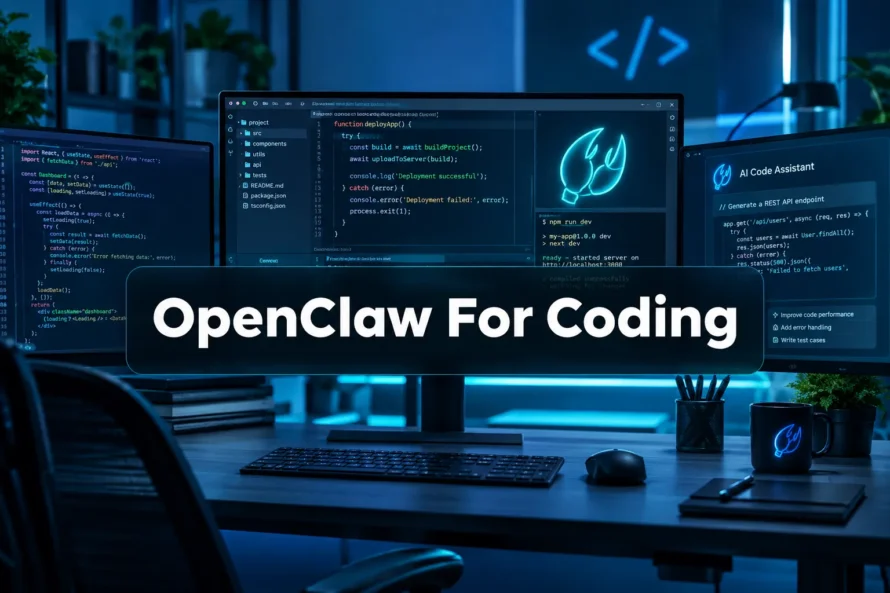
OpenClaw For Coding
Last updated: August 15, 2026
Quick Answer: OpenClaw is a self-hosted personal AI agent platform that connects your favorite chat apps, including WhatsApp, Telegram, and Slack, directly to powerful coding agents running on your own machine. For developers, OpenClaw For Coding means you can trigger code generation, run tests, open GitHub pull requests, and manage entire development workflows from a single chat message, without switching tools or leaving your phone.
Key Takeaways
- OpenClaw is free and open source, available on GitHub, and runs on macOS, Linux, and Windows [1]
- The dedicated coding agent skill lets you write, review, debug, and deploy code entirely through chat interfaces like WhatsApp and Telegram [7]
- Peter Steinberger, founder of PSPDFKit, built OpenClaw as a personal operating system for AI agents, and the community has since grown it into a full ecosystem [5]
- Setup takes under 15 minutes using a single curl command on macOS or Linux, or a manual install on Windows [6]
- OpenClaw works with Claude Code, Codex, and other AI backends, making it flexible for different developer preferences [3]
- The OpenClaw Foundation now governs the project, ensuring long-term stability and an extended-stable release path [8]
- Community showcases on openclaw.ai/showcase include 15-plus agent armies running across 3 machines, voice-guided production fixes, and full personal operating system setups [2]
- OpenClaw for coding is genuinely distinct from standalone tools because it persists context, chains skills, and runs autonomously while you are away from your desk [10]
If you want to view a live demo or get started immediately, clawtrust.ai
What Is OpenClaw For Coding?
OpenClaw For Coding is the practice of using the OpenClaw agent platform to automate software development tasks through conversational chat interfaces.
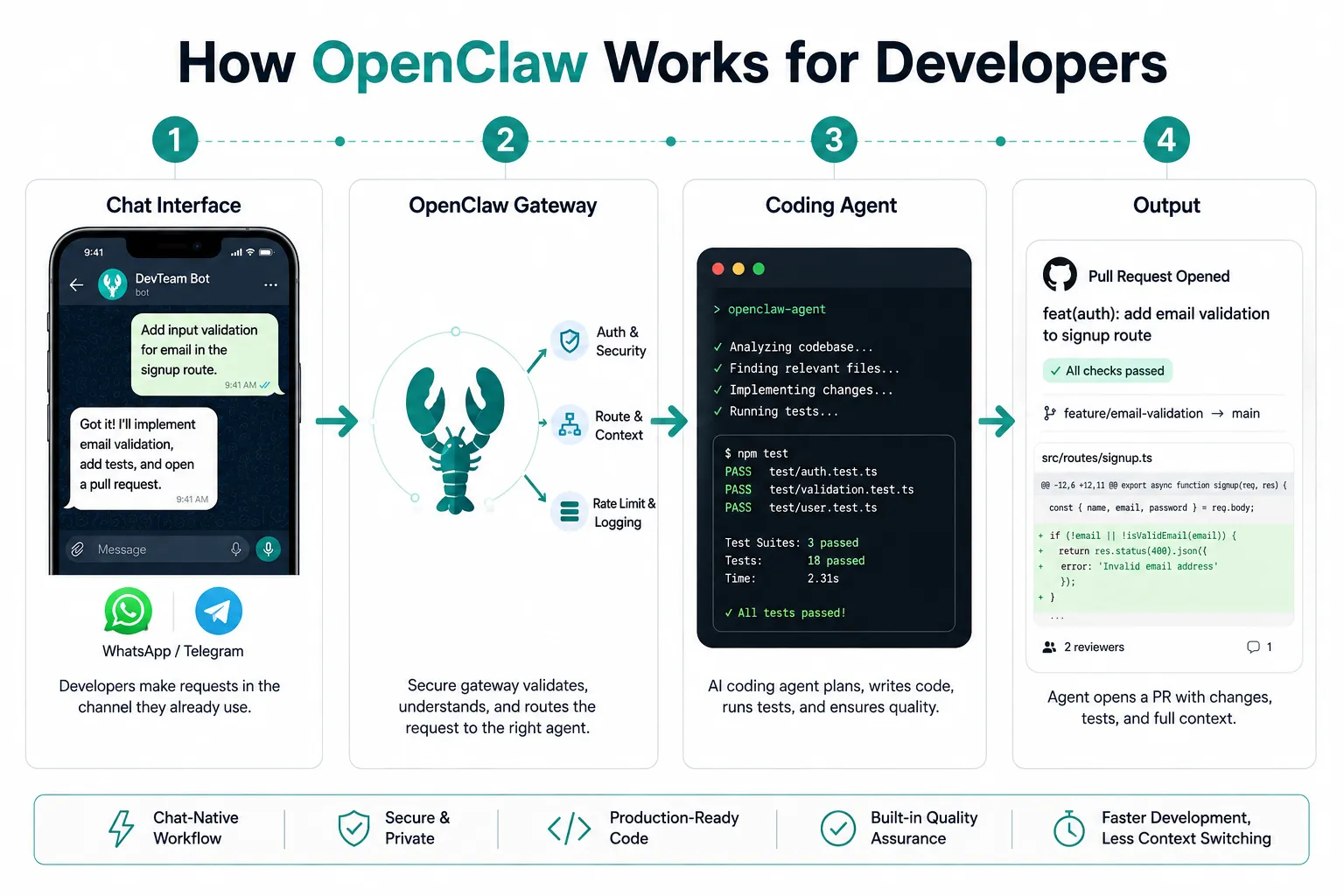
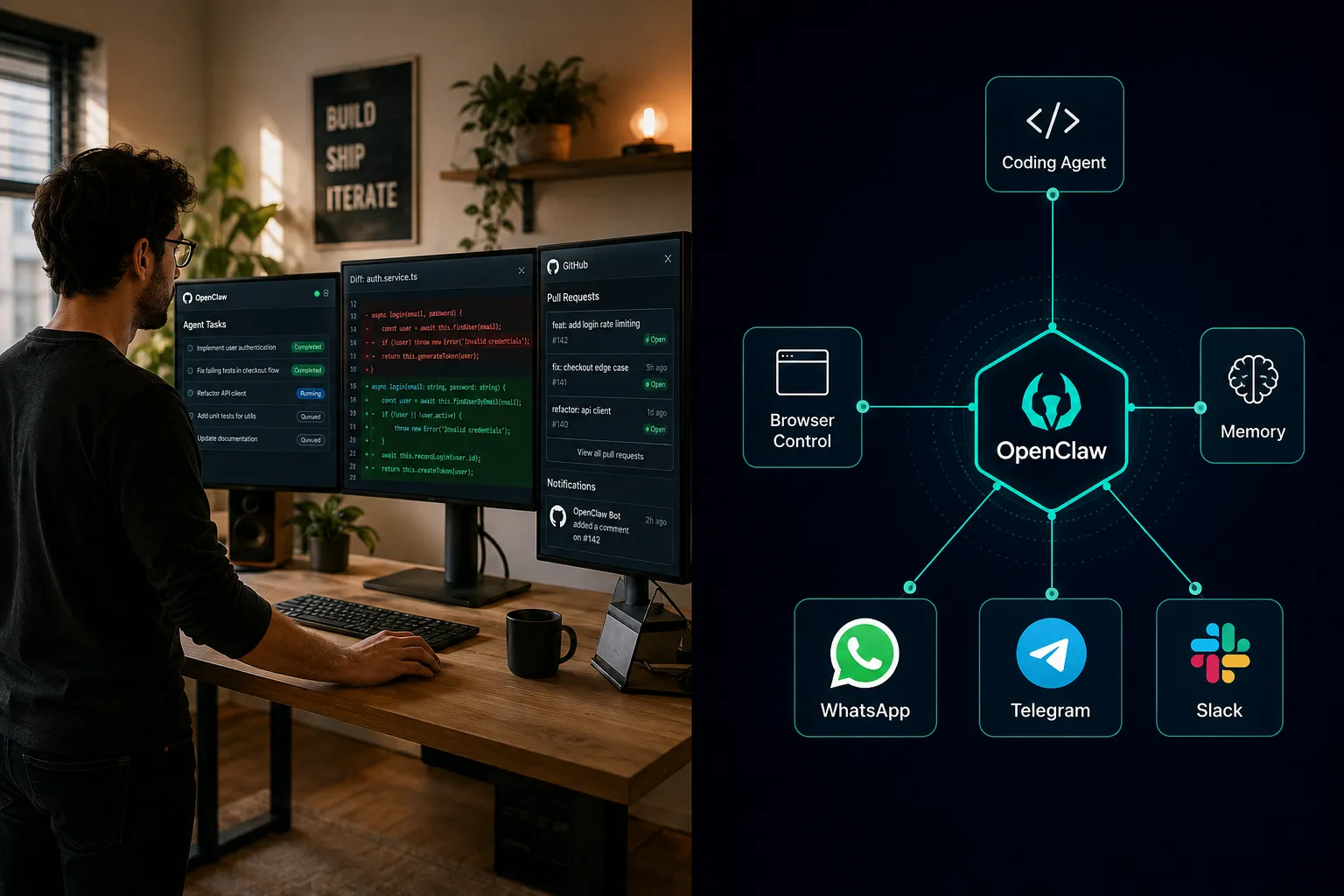
Rather than sitting at an IDE and manually triggering tools, you send a message from WhatsApp or Telegram and OpenClaw routes that request to a coding agent running on your local machine or a remote server.
The platform itself is best described as a personal AI operating system. You install it once, connect your chat apps, load the coding agent skill, and from that point forward your development environment becomes accessible from anywhere.
The official docs describe OpenClaw as “a gateway between your messaging apps and AI agents running on your infrastructure” [6].
That framing matters for developers because it means your code, your secrets, and your execution environment never leave your own hardware.
The coding use case is one of the most popular in the community. According to the OpenClaw showcase, developers are using it to automate everything from writing boilerplate and reviewing PRs to running test suites and managing deployment pipelines, all from a chat window [2].
How Does OpenClaw Work for Developers?
OpenClaw sits between your messaging app and your local agent runtime. When you send a message, OpenClaw parses the intent, selects the right skill (such as the coding agent), passes the request to the AI backend (Claude Code, Codex, or another model), and returns the result to your chat.
The coding agent skill documentation describes this as a “tool-use loop” where the agent can read files, write code, run shell commands, and commit changes autonomously [7].
The key architectural idea is that OpenClaw is not just a chatbot wrapper. It is a persistent, stateful agent host. That means:
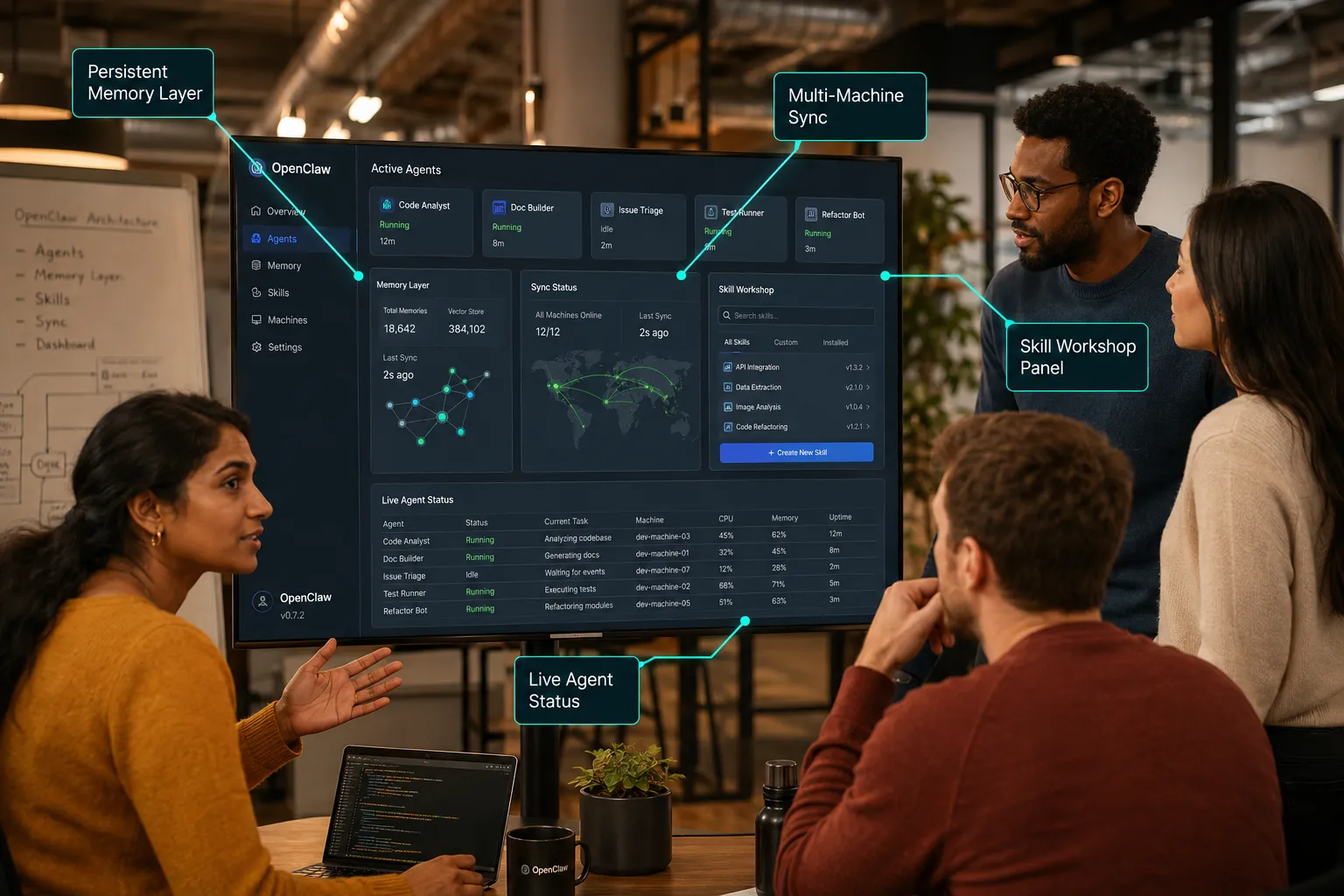
- The agent remembers context across sessions (persistent memory layer)
- Multiple agents can run in parallel across different machines
- Skills are modular, so you can add or remove capabilities without rebuilding the whole system
- The agent has full system access on your machine, meaning it can actually execute code, not just suggest it
Quick Start: Installing OpenClaw For Coding
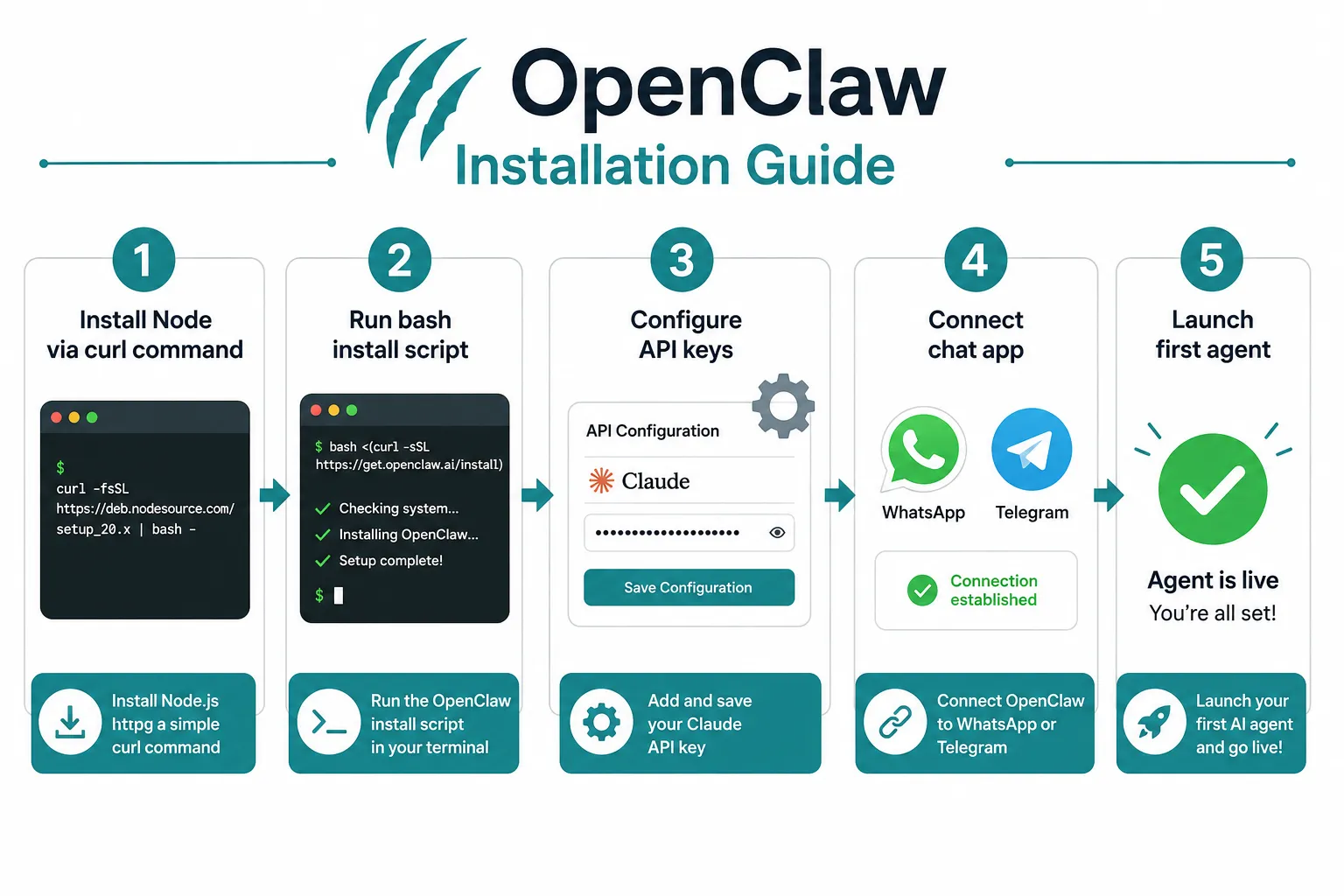
Getting OpenClaw set up for coding takes roughly 10 to 15 minutes on a fresh machine. The fastest path uses a single shell command.
Requirements before you start:
- Node.js 18 or later (the platform is built on Node)
- A Claude API key or OpenAI API key for Codex
- A Telegram bot token or WhatsApp Business API access
- macOS, Linux, or Windows (WSL recommended on Windows)
Installation steps:
- Open your terminal and run the install script. The command follows the pattern
curl -fssl https openclaw install bash, which pulls the latest release and runs the setup wizard [6]. The full verified command is documented at docs.openclaw.ai. - Follow the prompts to set your API keys and choose your chat connector (Telegram is the easiest starting point for most developers).
- Load the coding agent skill. From your OpenClaw directory, run the skill loader pointing at the coding-agent path. The SKILL.md file contains the exact configuration block you need [7].
- Configure your
tsconfig.jsonand anyjson tsconfig extensionsyour project needs if you are working in TypeScript. OpenClaw respects your existing project config. - Send a test message from Telegram: “List the files in my current project directory.” If OpenClaw responds with a file tree, you are live.
Windows note: On Windows, the recommended path is WSL2 with Ubuntu. Native Windows support exists but the curl -fssl https openclaw install bash path works most cleanly on macOS and Linux. The full tutorial on freeCodeCamp covers the Windows setup in detail [9].
Raspberry Pi / edge deployments: The community has documented running OpenClaw on a Raspberry Pi behind Cloudflare Tunnels. The phrase “steipete raspberry cloudflare feels like living in the future” has become something of a community motto, capturing how surreal it is to trigger a production deploy from your phone while the agent runs on a $35 computer [5].
If you want to view a live demo or get started immediately, clawtrust.ai
OpenClaw For Coding: What It Actually Does
OpenClaw for coding is not a code autocomplete tool. It is a full development automation agent. The distinction matters when you are evaluating it against tools like GitHub Copilot or Cursor.
Here is what the coding agent can do out of the box, based on the official skill documentation [10]:
Code generation and editing:
- Write new functions, classes, or entire files based on a natural language description
- Refactor existing code on request
- Apply patches and diffs directly to your working directory
Testing and debugging:
- Run your test suite and report failures back to chat
- Identify the likely cause of a failing test and propose a fix
- Execute arbitrary shell commands in your project environment
Version control:
- Stage, commit, and push changes to GitHub
- Open PRs with a generated description
- Review open PRs and summarize the diff
Browser control:
- Navigate to URLs, fill forms, and scrape data (via the browser skill, which pairs well with coding workflows for things like checking CI status or reading documentation)
Full system access:
- Read and write any file your user account can access
- Run build tools, linters, and deployment scripts
- Manage environment variables and secrets (with appropriate care)
The code assistant tutorial walks through a real example where a developer asks OpenClaw to “fix the failing tests in the auth module, commit the fix, and open a PR” and the agent completes all three steps without any further input [3].
Skill Workshop: Turn Agent Work Into Reusable Skills
One of the most powerful ideas in OpenClaw is the skill system. Every capability the agent has is packaged as a skill, and you can build your own. This is where OpenClaw for coding goes from useful to genuinely impressive.
A skill is a structured definition that tells OpenClaw what the agent can do, what tools it has access to, and how it should behave. The coding agent skill is the best-documented example [7]. You can fork it, modify it, and publish it back to the community.
Why this matters for developers:
- You can encode your team’s specific workflows as skills. For example, a skill that knows your deployment process, your PR template, and your test commands.
- Skills are version-controlled alongside your code.
- The OpenClaw Foundation maintains a registry of community skills, so you can pull in skills built by others with a single command [8].
Building a custom skill (overview):
- Copy the coding-agent skill directory as a starting point.
- Edit the
SKILL.mdto describe the new capability in natural language (this is what the agent reads to understand what it can do). - Add any tool definitions your skill needs (file access, API calls, shell commands).
- Register the skill in your OpenClaw config.
- Test it by asking the agent to perform the new task from chat.
The developer guide on doneclaw.com has a detailed walkthrough of building a custom deploy skill that integrates with a staging environment [5]. It is the best practical reference for skill authoring outside the official docs.
What People Are Building: Featured Builds and Community Showcases
The OpenClaw showcase is the best single place to view what developers are actually doing with the platform [2]. The builds range from clever personal automations to genuinely complex multi-agent systems.
15-Plus Agent Army Running Across 3 Machines
One featured build shows a developer running more than 15 simultaneous OpenClaw agents across 3 machines, each handling a different part of a microservices architecture.
One agent monitors the API gateway logs and files GitHub issues when error rates spike. Another agent handles dependency updates by running npm audit, opening PRs for fixes, and tagging them for review.
A third agent watches the CI pipeline and sends a Telegram message when a build fails, along with a summary of the failing tests.
This kind of setup would have required a dedicated DevOps engineer or a paid SaaS platform a few years ago. Now it runs on personal hardware.
Personal Operating System With Daily Briefings
Several developers in the community use OpenClaw as a personal operating system. Every morning, the agent sends a briefing via Telegram that includes: open PRs awaiting review, failing tests in any monitored repo, upcoming calendar events pulled from a connected calendar skill, and a summary of overnight Slack messages that mentioned their username.
This is the “personal” in personal AI agent. The briefing is built from skills the developer assembled themselves, using their own data, running on their own machine.
Voice-Guided Production Fix While Walking the Dog
One of the most-cited showcase entries describes a developer who received a production alert on their phone while walking their dog. Using voice-to-text in Telegram, they described the symptom to OpenClaw. The agent located the relevant code, identified a null pointer exception introduced in the last deploy, generated a fix, ran the tests, and opened a PR, all before the walk was over.
This story captures why OpenClaw for coding resonates so strongly with developers who are tired of being chained to their desk for every incident.
One Chat Controlling Mail, Messages, Orders, Calls, and a Vault
Another build integrates OpenClaw with email, WhatsApp, Telegram, Slack, an e-commerce order system, a VoIP provider, and a password vault. The developer manages their entire digital life from a single Telegram thread. For coding specifically, they use it to receive code review requests via email and respond with approval or change requests without opening a browser.
What People Say: Community Sentiment and Expert Views
The community response to OpenClaw for coding has been strongly positive, with a few honest caveats. The yeasy gitbook guide collects community feedback and describes the platform as “the closest thing to having a junior developer available 24 hours a day” [4].
Common praise themes from the community:
- “Just finished setting openclaw up and I cannot believe how much time this saves on repetitive tasks.”
- “Got openclaw set up in under 20 minutes. The coding agent handled a refactor I had been putting off for weeks.”
- “Asked openclaw to review my PR and it caught three issues my human reviewers missed.”
- “Incredible kudos steipete for building something this thoughtful. It feels like the tool was designed by someone who actually writes code every day.”
- “Setting openclaw steipete-style on a Raspberry Pi behind Cloudflare is genuinely one of the most satisfying technical setups I have ever done.”
The phrase “blown away” appears repeatedly in community posts. Developers who come from using standalone AI coding assistants consistently report that the persistent memory and autonomous execution model of OpenClaw feels qualitatively different.
Honest criticisms:
- The initial configuration has a learning curve, particularly around connecting WhatsApp (which requires a Business API account or a community-maintained bridge).
- The coding agent occasionally over-commits, making changes the developer did not intend. The recommended mitigation is to run the agent in “dry run” mode first for unfamiliar tasks.
- Windows support, while present, is less polished than macOS and Linux. Most power users run it on Linux or macOS.
How Peter Steinberger Built OpenClaw
Peter Steinberger, the creator of PSPDFKit (now Nutrient), built OpenClaw out of personal frustration with fragmented AI tools. The steipete openclaw origin story is well-documented in the developer guide [5].
Steinberger wanted a single system that could handle his entire personal and professional workflow through the chat apps he already used. He started with a simple Telegram bot that could run shell commands. Over time, he added persistent memory, the skill system, browser control, and multi-agent support. The result was OpenClaw.
The “peter steinberger creator” framing is important because it explains the tool’s philosophy. OpenClaw is built by a developer, for developers, with a strong bias toward personal control and self-hosting. There is no vendor lock-in. There is no subscription. You own everything.
The steinberger creator openclaw approach also means the project has strong opinions about architecture. OpenClaw is deliberately not a SaaS product. The OpenClaw Foundation, which now governs the project, has committed to keeping the core free and open source [8].
Introducing the OpenClaw Foundation and Long-Term Stability
The OpenClaw Foundation was established to ensure the project has a sustainable governance structure as it grows. The foundation oversees the core repository, the skill registry, and the extended-stable release program.
The openclaw foundation release model is modeled loosely on how Node.js handles LTS (Long-Term Support) releases.
Each major version goes through an “active” phase, then moves to “extended-stable” status, where it receives security patches and critical bug fixes for an extended period.
This matters for developers who build production systems on top of OpenClaw and need stability guarantees.
The foundation also manages the official openclawai.io portal, which serves as the hub for skill discovery, community builds, and sponsor acknowledgment [8].
Sponsors play a meaningful role in the ecosystem. The foundation accepts sponsorships from companies that build on or integrate with OpenClaw, and those sponsors are acknowledged publicly.
This model keeps the project independent while providing resources for maintenance and documentation.
OpenClaw vs Other Coding Tools: How It Compares
OpenClaw for coding occupies a unique position in the developer tooling landscape. It is not a direct replacement for GitHub Copilot or Cursor, but it competes with them in certain workflows.
| Tool | Primary Interface | Autonomous Execution | Persistent Memory | Self-Hosted | Cost |
|---|---|---|---|---|---|
| OpenClaw | WhatsApp, Telegram, Slack, Discord | Yes (full system access) | Yes (built-in) | Yes | Free (open source) |
| GitHub Copilot | IDE plugin | Limited (suggestions only) | No | No | Paid subscription |
| Cursor | IDE (fork of VS Code) | Partial (Composer mode) | Limited | No | Paid subscription |
| Claude Code | CLI | Yes (CLI-based) | Session only | Partial | API usage costs |
| Codex (OpenAI) | API / CLI | Yes (with scaffolding) | No | No | API usage costs |
The “claude code codex” comparison is worth dwelling on. Both Claude Code and Codex are powerful coding agents, but they require you to be at a terminal to use them.
OpenClaw wraps either backend (you choose which AI model powers the coding agent) and adds the chat interface, persistent memory, and skill chaining on top.
The result is that you get the raw capability of claude code codex with the accessibility of a messaging app.
OpenClaw vs Claude Code (specific): Claude Code is a CLI tool from Anthropic that runs coding tasks in your terminal with strong reasoning capabilities. OpenClaw can use Claude as its backend, meaning you get Claude’s intelligence routed through OpenClaw’s gateway.
The openclaw foundation has documented this integration path in the official docs [6]. If you already pay for Claude API access, adding OpenClaw costs nothing additional.
Microsoft launches Scout is worth mentioning in this context. Microsoft’s Scout assistant, announced in 2026, is described as an “OpenClaw-inspired personal assistant” that runs within Windows.
The Build 2026 keynote specifically referenced the model of local agent execution that OpenClaw pioneered, noting that “furthering Windows as the trusted platform for development” includes support for microsoft execution containers that mirror the sandboxed execution model OpenClaw uses.
This is a meaningful industry signal: the architecture OpenClaw built is now being adopted by one of the largest software companies in the world.
OpenClaw Pricing: Is It Free?
OpenClaw is free and open source. The core platform costs nothing to download, install, or run [1]. You will pay for the AI backend you choose (Claude API, OpenAI API, etc.), but OpenClaw itself has no subscription fee, no per-seat license, and no usage limits imposed by the platform.
Cost breakdown for a typical developer setup:
- OpenClaw platform: free
- Claude API (if using Claude as the backend): pay-per-token, roughly a few dollars per month for moderate coding use
- Telegram bot: free
- WhatsApp Business API: free tier available, paid tiers for high volume
- Hosting (if running on a VPS instead of local): standard server costs
For most individual developers, the total monthly cost is under $10, dominated entirely by AI API usage. This makes OpenClaw for coding dramatically cheaper than most paid coding assistant subscriptions, which typically run $10 to $30 per month for a single user.
The openclawai.io site lists current sponsor tiers and community support options for teams that want enterprise-grade support [8].
OpenClaw Setup, Troubleshooting, and Common Mistakes
Even a well-designed tool has sharp edges. Here are the most common issues developers run into when setting up OpenClaw for coding, and how to fix them.
Issue: The coding agent runs but does not commit to GitHub Cause: The agent does not have a configured Git identity or SSH key. Fix: Run git config --global user.email and git config --global user.name in your terminal, and ensure your SSH key is added to your GitHub account. The agent uses your system Git config.
Issue: WhatsApp messages are not reaching the agent Cause: WhatsApp integration requires either a Business API account or a community bridge. The standard WhatsApp personal app cannot be connected directly without a bridge. Fix: Use the community-maintained WhatsApp bridge documented in the official docs [6], or switch to Telegram for initial setup (Telegram is much simpler to connect).
Issue: The agent makes changes I did not intend Cause: The coding agent has full system access by default, and natural language instructions can be interpreted broadly. Fix: Use the --dry-run flag when testing new instructions. Review the proposed changes before the agent commits. You can also scope the agent’s file access in the skill configuration.
Issue: json tsconfig json errors on TypeScript projects Cause: OpenClaw’s coding agent reads your project’s tsconfig but may not resolve path aliases correctly in all setups. Fix: Explicitly set baseUrl and paths in your tsconfig.json. The developer guide has a section on TypeScript project configuration [5].
Issue: OpenClaw not working on Windows (native, not WSL) Cause: Some shell commands in the coding agent skill use Unix-style paths and bash syntax. Fix: Use WSL2. The freeCodeCamp tutorial covers the WSL2 setup path in detail [9]. Native Windows support is improving but WSL2 is the recommended path for macos linux windows parity.
Who Should Use OpenClaw For Coding?
OpenClaw for coding is a strong fit for developers who work across multiple projects, frequently context-switch, or want to automate repetitive development tasks.
It is also well-suited for developers who are often away from their desk but need to stay on top of their codebase.
Best fit:
- Solo developers and freelancers managing multiple client projects
- Developers who do on-call work and need to respond to incidents from anywhere
- Teams that want to automate PR review, dependency updates, or test monitoring
- Developers who already use Telegram or WhatsApp heavily and want to consolidate their workflow
- Anyone building personal automation systems or “personal OS” setups
Less ideal for:
- Developers who need deep IDE integration (autocomplete, inline suggestions, refactor shortcuts) as their primary workflow. OpenClaw is an agent, not an IDE plugin.
- Teams with strict security policies that prohibit self-hosted tools with full system access.
- Beginners who are just learning to code and need guided, step-by-step feedback in real time. OpenClaw is powerful but assumes you know what you are asking for.
Is OpenClaw good for beginners? It can be, with caveats. The freeCodeCamp tutorial is genuinely beginner-friendly and walks through everything from first install to first agent task [9].
But the platform rewards developers who understand what the agent is doing under the hood. A beginner who does not understand Git, for example, may find the agent’s autonomous commits confusing or alarming.
OpenClaw on Mobile: Android and iOS
OpenClaw is finally available on Android and iOS as a companion app, making it easier to manage your agents from your phone without relying solely on a third-party chat app.
The mobile app provides a view of active agents, skill status, and recent outputs, and lets you send commands directly without needing to open WhatsApp or Telegram.
This is a significant quality-of-life improvement for developers who use OpenClaw as a personal operating system. You can now view your agent army’s status at a glance, approve pending actions, and review code diffs on your phone screen.
The chat-first model (WhatsApp, Telegram, Slack, Discord, Signal) remains the primary interaction method for most users, and the mobile app is positioned as a complement rather than a replacement for those integrations.
OpenClaw For Different Programming Languages
OpenClaw’s coding agent is language-agnostic by design. The agent uses your project’s existing toolchain, so it works with whatever language and build system you are already using.
Verified working environments (from community reports and docs):
- JavaScript and TypeScript: Full support, including npm/yarn/pnpm, tsconfig handling, and Node-based test runners [7]
- Python: Works with pip, poetry, pytest, and Django/Flask project structures
- Rust: Can run
cargo build,cargo test, and manage Cargo.toml - Go: Supports
go build,go test, and module management - Ruby: Works with bundler and Rails projects
- Shell scripting: Native, since the agent executes shell commands directly
The agent does not have built-in language-specific intelligence beyond what the underlying AI model provides. If you use Claude as your backend, you get Claude’s strong multi-language capabilities.
If you use Codex, you get OpenAI’s code-specialized model. The choice of AI backend matters more for code quality than OpenClaw’s own architecture.
Stay in the Loop: Resources, Updates, and Community
The OpenClaw ecosystem is growing quickly. Here are the best places to stay current:
- GitHub: The openclaw/openclaw repository is the source of truth for releases, issues, and skill contributions [1]
- Official docs: docs.openclaw.ai covers installation, configuration, and the full skill API [6]
- Showcase: openclaw.ai/showcase is updated regularly with new community builds [2]
- freeCodeCamp tutorial: The full beginner tutorial is the best onboarding resource for new users [9]
- Yeasy guide: The community gitbook collects tips, tricks, and community wisdom [4]
The newsletter at openclawai.io sends updates on new features, integrations, and what the community calls “lobster wisdom,” which is the unofficial term for hard-won lessons from running agents in production [8].
FAQ: People Also Ask About OpenClaw For Coding
Can we use OpenClaw for coding?
Yes, OpenClaw is well-suited for coding. The platform includes a dedicated coding agent skill that can write, edit, debug, and deploy code through chat apps like WhatsApp and Telegram. It supports all major programming languages, integrates with GitHub for PR management, and can run your test suite autonomously. Developers use it for everything from quick fixes to full feature development cycles. [7]
Which AI tool is best for coding?
The best AI coding tool depends on your workflow. GitHub Copilot and Cursor excel at inline IDE suggestions. Claude Code and Codex are strong for autonomous task execution in the terminal. OpenClaw for coding stands out when you want persistent memory, multi-agent orchestration, and the ability to trigger coding tasks from a chat app on your phone. For developers who want maximum automation with self-hosted control, OpenClaw is a top choice in 2026. [3]
What are people doing with OpenClaw?
Developers are using OpenClaw to run 15-plus agent armies across multiple machines, automate PR reviews and dependency updates, receive daily development briefings via Telegram, fix production incidents remotely via voice-to-text, and build personal operating systems that manage email, messages, code, and deployments from a single chat thread. The showcase page documents dozens of real builds from the community. [2]
Can OpenClaw be integrated with GitHub?
Yes, OpenClaw integrates with GitHub natively through the coding agent skill. The agent can read and write files in your repository, stage and commit changes, push branches, open pull requests with generated descriptions, and review existing PRs. You connect it using your system’s existing Git configuration and SSH keys. No additional GitHub app installation is required for basic operations, though the community has built more advanced GitHub integrations as custom skills. [7]
Conclusion
OpenClaw For Coding is one of the most genuinely useful developer tools to emerge in the past few years, not because it does something entirely new, but because it assembles existing capabilities (AI code generation, chat interfaces, persistent memory, autonomous execution) into a coherent personal system that runs on your own hardware.
The case for trying it is straightforward. It is free. Takes 15 minutes to set up. It works with the chat apps you already use.
And the community has already built out a rich ecosystem of skills, guides, and showcases that make it easy to see what is possible before you write a single line of configuration.
The case for caution is also real. Full system access means the agent can do real damage if you give it ambiguous instructions.
The WhatsApp integration has friction. And Windows support, while improving, still lags behind macOS and Linux.
Actionable next steps:
- Read the freeCodeCamp beginner tutorial to understand the full setup process before you start [9].
- Browse the showcase to find a build that matches your use case [2].
- Start with Telegram (not WhatsApp) for your first integration. It is simpler and faster.
- Load the coding agent skill and test it on a non-critical project first.
- When you are ready to go deeper, explore the skill workshop documentation to build custom skills for your specific workflow [7].
If you want to view a live demo or get started immediately, clawtrust.ai is the recommended starting point for new users looking to experience OpenClaw For Coding firsthand.
References
[1] Openclaw – https://github.com/openclaw/openclaw [2] Showcase – https://openclaw.ai/showcase/ [3] Code Assistant – https://openclaw-ai.online/tutorials/use-cases/code-assistant/ [4] Readme En – https://yeasy.gitbook.io/openclaw_guide/readme_en [5] Openclaw For Coding Developer Guide – https://doneclaw.com/blog/openclaw-for-coding-developer-guide/ [6] docs.openclaw.ai – https://docs.openclaw.ai/ [7] Skill – https://github.com/openclaw/openclaw/blob/main/skills/coding-agent/SKILL.md [8] openclawai – https://openclawai.io/ [9] Openclaw Full Tutorial For Beginners – https://www.freecodecamp.org/news/openclaw-full-tutorial-for-beginners/ [10] Skill – https://raw.githubusercontent.com/openclaw/openclaw/main/skills/coding-agent/SKILL.md